- 08-05-2020
- 13:00
- timer 2 minutes
Integrating software
Connecting software means linking two or more software systems together so that they exchange information with each other automatically, without you having to do anything. Most software systems can be linked to accounting systems or other business software. This comes in handy when you are happy with your current software and want to combine it with a new software system.
Connecting software with an API
A connection is usually made with an API integration. API stands for "Application Programming Interface" and allows two different applications to communicate with each other and give each other access to information.
There are extensive explanations online of what exactly an API is. But an explanation in a short video may work much better.
Why connect software
When software is well connected, exchanging this information happens completely automatically, without you having to perform any manual action for it.
The integration filter
A handy tool on SoftwareWatcher is the integration filter. With the integration filter you can quickly see whether the software you are interested in connects to your current software system.
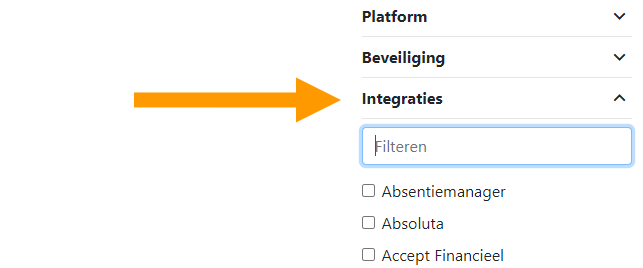
All you have to do is enter the name of your current software in the filter. The results that remain in the overview can be connected to your own software system.
Other solutions for connecting software
If your current software cannot be connected (automatically) to the software you are interested in, there are other solutions:
- Custom integration: Software suppliers are often willing to build a custom integration so that the software can be connected.
- Exporting and importing: Export the data and import it into your other business software.
- With an API, all kinds of things are often possible. So ask a software supplier about the options for connecting software.
Exporting and importing usually involves a manual step. You have to edit the export file so that it can be read properly by other software. This exporting and importing is often done via an Excel file.
Search, compare and select software
Are you convinced of the added value of software? Are you curious which software suits your business? Or do you want to find out whether your software connects to your current software systems? Then click the "View categories" button, choose a software category and compare all the software.
Would you like help finding a suitable software system? Then start the software selection with the “start software selection” button below, select the software features relevant to your company and find the software that suits your company.
If you still can't decide, please contact us or call us, and we will gladly help you find the right business software for your business.
Software advice from SoftwareWatcher
Do you need advice on the best software? Get in touch now and we will draw up a list of the best software for your organisation.
Non-binding and without obligation