
- 27-07-2020
- 09:00
- timer 7 minutes
The best accounting software for freelancers
Are you a freelancer looking for suitable accounting software? Which accounting software is best for freelancers? Which accounting features are important to me? And how do I ultimately make the best choice between the available accounting packages.
This blog covers the following topics:
- The five general must-have accounting features for freelancers
- Specific accounting features for freelancers
- Which accounting features are important to me as a freelancer?
- How do I make the best choice between the available accounting packages as a freelancer?
"Which accounting software is best for freelancers?" is a question freelancers ask a lot. Unfortunately there is no single answer, as it depends heavily on what kind of freelancer you are. A freelancer with a physical shop, for example, has very different requirements for accounting software than a freelancer who provides services. Still, there are a number of general "must-have" accounting features that matter to every freelancer.
The five general must-have accounting features for freelancers
✅ Automatic bank link
The accounting software can automatically import your bank statements every day. This way you do not have to download and import the bank statements manually. Note: not all accounting software offers an automatic link with every bank.
✅ Scanning and recognising receipts and invoices
Scan and recognise software supports you in the entire process of digitally processing purchase invoices, sales invoices, receipts and other documents. This is often part of an accounting package, but in practice you also often see accounting software that can integrate with scan and recognise software. This software often has far more extensive functionality than a scan and recognise module in the accounting software itself. If you have to process a lot of receipts and invoices as a freelancer, it is advisable to buy a separate scan and recognise system. See below for the best scan and recognise software for freelancers:
The best scan and recognise software for freelancers
✅ Automatic booking suggestions
As mentioned, documents and/or invoices are recognised automatically. The scan and recognise software automatically reads the relevant data from an invoice. For a purchase invoice, for example, it recognises the invoice number, the supplier and the total amount including and excluding VAT. On this basis an automatic booking suggestion is made, so that the invoice is processed correctly in your accounts.
✅ VAT return and link with the Tax Administration
An important part of bookkeeping is the VAT return. The accounting software automatically keeps track of how much VAT you are due to receive or have to pay. The software then prepares the return for you automatically and you can send it directly to the Dutch Tax Administration (Belastingdienst). This saves you as a freelancer a lot of time and unnecessary work.
✅ Digital archive
By law, businesses are required to keep all invoices and receipts. This must even be done for 7 years. Accounting software without a digital archive is therefore not recommended. In the accounting software or scan and recognise system, invoices and receipts are stored automatically. This lets you find your invoices easily and quickly.
Specific accounting features for freelancers
In addition to the general "must-have" accounting features, there are also a number of specific features that are essential for one freelancer and irrelevant for another.
► Invoicing module
An invoicing module is a must if you need to send invoices to customers. With an invoicing module you can send invoices directly from the accounting software. All the legal requirements an invoice must meet are taken into account, and you can often adjust the layout yourself.
► Recurring invoicing
Do you often have to invoice periodically as a freelancer? Then this feature is a godsend. You set up an invoice once for a certain period and the software does the rest for you.
► Online payments
Do you invoice a lot of consumers? Then it is wise to send a customer an invoice with a payment link on it, for example an iDEAL button. In practice you see that these invoices are paid much faster than an invoice without a payment link.
► Payment file
Do you transfer your invoices one by one via the bank? This can take a lot of time and cause frustration. An automatic payment file is then a good solution. The accounting software creates a payment file that you can import into the bank. You can then pay multiple invoices in one go.
► Quotation module
You still see many freelancers making quotations in Word and Excel. This takes a lot of time and is error-prone. Many accounting packages include a quotation module. This way you can create and send quotations directly from the accounting software. Also read the article: Creating quotations with software
Do you really want to impress with your quotations? Then specialised quotation software is really something for you. See below for the best quotation software for freelancers:
The best quotation software for freelancers
► Digital quotation approval
Getting a quotation approved is often a cumbersome process. The customer has to print the quotation, sign it, scan it and send it back. With this feature a customer can accept the quotation online quickly and easily, so you always have a signed quotation behind your assignment.
► CRM module
Do you have a lot of customers? Then a CRM module is a "must-have". Many accounting packages include one, but often in a limited form. If you really want an extensive CRM system, see below for the best CRM systems for freelancers:
The best CRM software for freelancers
► Payment reminders and debt collection
Unfortunately, customers sometimes do not pay on time, or even at all. That is annoying and costs a lot of time and effort. With this feature it is easy to remind customers automatically and to start a debt collection process.
► Mileage tracking
If you drive a lot of kilometres as a freelancer, such as painters, builders and consultants, a mileage tracking module is a must. It is handy to be able to record the trips you make easily and quickly, and even to pass them on to the customer on your invoice.
► Mobile-friendly and/or mobile app
If you are on the road a lot, mobile-friendly accounting software or a mobile app is very valuable. In this case you can quickly check your invoices or send out one more invoice.
► Projects and hours
If you work a lot on a project basis as a freelancer, you need to be able to keep track of the hours per project.
► Inventory module
Do you have a business with a lot of stock? Then it is handy to have an inventory module.
Note: accounting software does not necessarily have to be the place where you do this. If you have a shop with a POS system, for example, it makes more sense to keep track of your stock there.
Which accounting features are important to me as a freelancer?
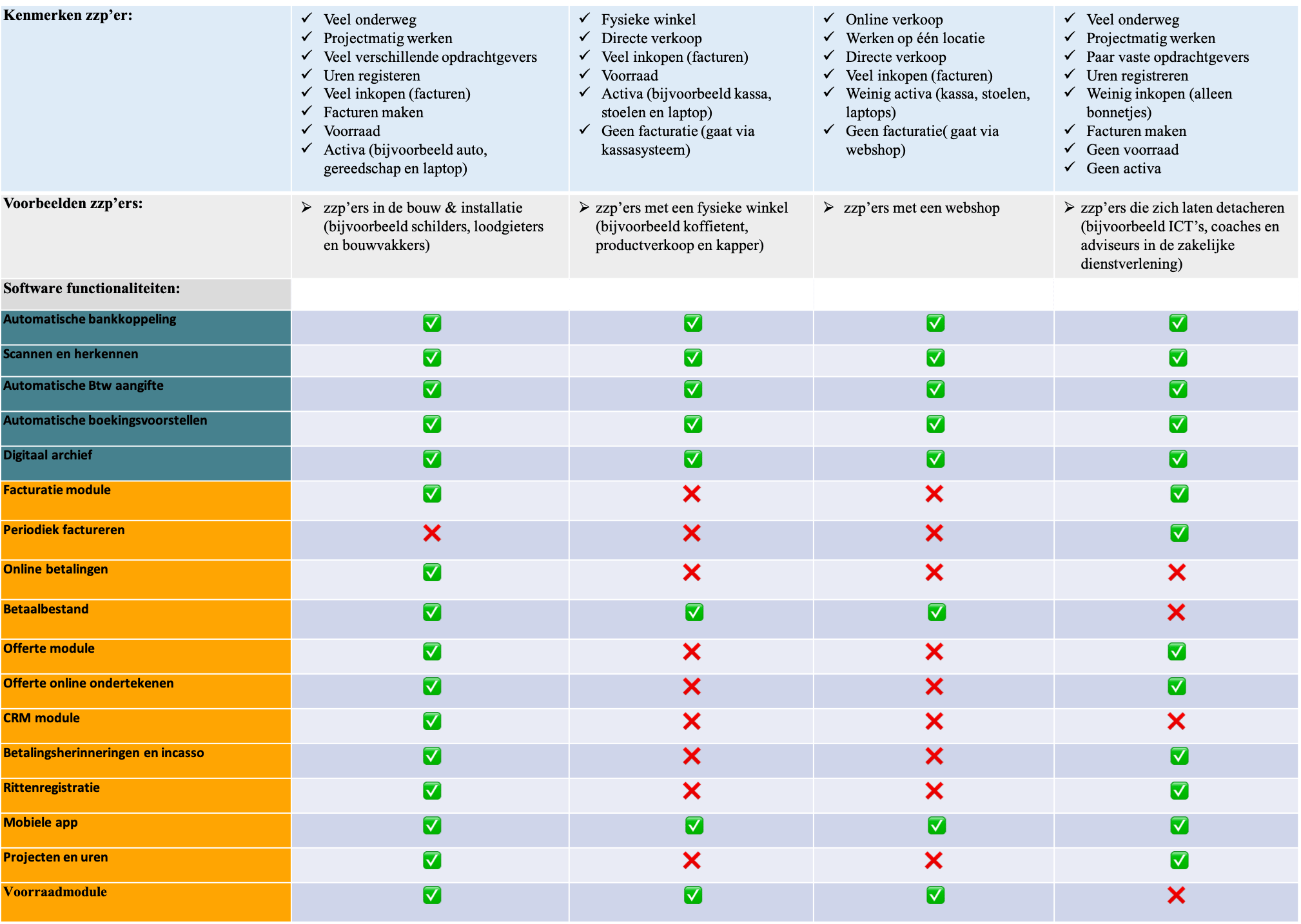
It is therefore difficult to say which accounting features an individual freelancer needs. To still give a good answer, the image below shows which accounting features are useful for each type of freelancer:
How do I make the best choice between the available accounting packages as a freelancer?
Choosing the best accounting software is quite difficult, because you have to take many things into account. Moreover, one freelancer has other personal preferences than another. That is why it is advisable to test accounting software yourself first and/or to request a demo of it.
Tip: First make a top 3 for yourself and then request demos.
To help you get started with selecting the best accounting software, below you will find the best accounting packages for each type of freelancer.
You can then easily compare them with each other and request several demonstrations at once, for free.
In addition, you can use filters to select extra features that are important to you.
► Best accounting software for freelancers with a webshop.
Want to request demos of your top 3 quickly and easily? That is very simple with SoftwareWatcher. See the video below:
Would you rather do a complete software selection yourself to find the best accounting software for freelancers? Then start the software selection tool with the "start software selection" button and find out which accounting software suits you by filling in the features.
Software advice from SoftwareWatcher
Do you need advice on the best software? Get in touch now and we will draw up a list of the best software for your organisation.
Non-binding and without obligation