Profile managed by Metaware · Last updated on
Metaware is quality management software for QHSE and information security, supporting standards such as ISO 9001, VCA and ISO 27001. In the Proware platform organisations manage their management system and documentation, Improware is used for complaint registration and Infoware for digital forms.
The price is on request.
You can try Metaware platform for free and request a demo.
Unique Selling Points
- - Scalable collaboration platform - Working from one concept (corrective -> analysable -> preventive and plannable) - Documentation quickly findable, focused on being up to date and expandable into a knowledge base - Workflow control for procedural actions - Accessible, with visual navigation - Integrated risk and compliance management - Decentralised registration, central process monitoring - Platform adapts to the device (notebook, tablet, smartphone) - Minimal maintenance burden - Pleasant licence model: only core users count, and combination discounts
Metaware platform at a glance
- Category: Quality management system
Compare Metaware platform with 11 other packages for quality management systems
Software info
Your quality system has been around since the 90s. First as a paper manual for all department managers, far too detailed because everyone had recorded all their activities. Later it became digital PDF documents on the shared drive. Word documents had authors, and they made the PDFs. But everything was still too detailed. Risk-based steering towards your goals became the new approach. If you know where your risks lie, what your goals are and how you perform yourself, you have focus. You can concentrate on the important things and leave out unnecessary ballast in your documented management system, the old 'manual'.
What used to be your (quality) manual is now a management system platform. More comprehensive: quality, safety, environment, information security, .. It is an integrated environment for the documented processes, the risk analysis with control measures, all workflow processes and, last but not least, performance - the dashboard.
Platform concept
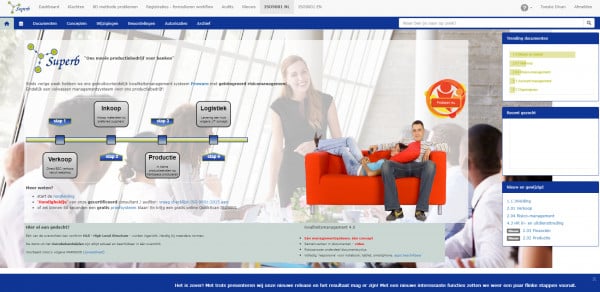
What is the concept of the current management system, summarised in one picture.
It starts with the 'drivers', the forces behind controlling your organisation, which force you towards an effective management system: the goals, customer requirements, (mandatory) processes or contracts and legislation. 'Enablers' ultimately make it possible to achieve the desired result, a satisfied customer. The management system facilitates the 'enablers' with alerts, analysis tools or steering options.
Trial system
Just for fun, set up our platform as a trial in 60 seconds, a software tool for management systems: documentation, risk analysis, complaints, problem reports, audits, supplier management, ... And look for the differences with your current way of working ...
Metaware platform - simpel en innovatief features
i Balance sheetremove
- Balance sheet
- Gives insight into a company's assets, equity and debts.
i Benchmark remove
- Benchmark
- Your own figures can be compared with the industry.
Utilisation rate reportsremove
i Emergency registrationremove
- Emergency registration
- Generating a report of who is on the company premises.
i Calculating scenarios remove
- Calculating scenarios
- Drawing up forecasts based on different future scenarios.
i Drillthrough remove
- Drillthrough
- Option to click through on a chart for a detailed view.
i Financial ratiosremove
- Financial ratios
- Reports on financial ratios such as liquidity, solvency and profitability.
i HR reportsremove
- HR reports
- Gives insight into HR-related reports. Think, for example, of the male/female ratio and age structure.
i Cash flow statementremove
- Cash flow statement
- Gives insight into the cash flows within a company.
i Cost centre reportsremove
- Cost centre reports
- Results can be displayed per department or branch.
Cost forecastsremove
i Employee productivityremove
- Employee productivity
- Insight into the productivity of employees and/or teams.
i Revenue forecastsremove
- Revenue forecasts
- Use the software to make forecasts relating to revenue.
i Revenue reportsremove
- Revenue reports
- Reports on revenue from different product and/or service categories.
i Revenue reports per employeeremove
- Revenue reports per employee
- Reports on revenue from different product and/or service categories per employee.
i Revenue distribution of customer portfolioremove
- Revenue distribution of customer portfolio
- Gives insight into revenue per customer and/or customer group.
i Work-in-progress positionremove
- Work-in-progress position
- Insight into the work-in-progress position overall and/or per project.
i Training reportsremove
- Training reports
- Gives insight into training-related reports. Think, for example, of attendance rates and pass rates.
i PDP reportsremove
- PDP reports
- Overviews of employees relating to objectives, competencies and development.
Forecast balance sheetremove
Forecast cash flow statementremove
Forecast profit and loss accountremove
Project resultsremove
i Profit and loss accountremove
- Profit and loss account
- Gives insight into a company's revenue and costs.
i Absence reports remove
- Absence reports
- Gives insight into leave and absence figures.
i Backupscheck
- Backups
- A backup of all data is made on a separate server.
i IP address securitycheck
- IP address security
- Users can only access the software if the correct IP address is recognised.
i Data storage in Europe check
- Data storage in Europe
- The data is stored in Europe.
i Flexible user rights check
- Flexible user rights
- It is possible to give employees/users different user rights.
i Single Sign On (SSO)check
- Single Sign On (SSO)
- Allows users to log in once, after which they automatically get access to multiple applications.
i Two-factor authenticationcheck
- Two-factor authentication
- Two-factor authentication is an extra layer of security when logging in to the software. For example a password and an SMS verification.
Agriculture, horticulture and fishingremove
Construction and installationremove
Industry and manufacturingremove
Trade and retailremove
Hospitality and cateringremove
Transport and logisticsremove
Business servicesremove
ICT and technologyremove
Real estate and rentalremove
Healthcare and welfareremove
Education and childcareremove
Government and public sectorremove
Energy, water and environmentremove
Culture, sport and recreationremove
Media, marketing and communicationremove
€1 to €5remove
€5 to €10remove
€10 to €25remove
€25 to €50remove
€50 to €75remove
€75 to €100remove
€100 or moreremove
HKZremove
ISO 14001remove
ISO 15189remove
ISO 16949remove
ISO 17025remove
ISO 22301remove
ISO 26000remove
ISO 27001remove
ISO 45001remove
ISO 9001remove
NENremove
NIAZremove
VCAremove
Wftremove
i Visitor registrationremove
- Visitor registration
- Visitors can be registered using the software.
i Communication via softwareremove
- Communication via software
- Within the software it is possible to communicate about internal and external documents.
Sharing news itemsremove
i Internal chatremove
- Internal chat
- Internal chat function for chatting with colleagues.
i Logremove
- Log
- Overview of who performed which actions and when.
i Online calendarremove
- Online calendar
- Plan and follow meetings, tasks and events for yourself and other colleagues.
i Process alertsremove
- Process alerts
- The software gives a notification when an important event occurs.
i Timelineremove
- Timeline
- Involving employees in the organisation through a timeline, where they can share content themselves, like posts and leave comments.
i Forms and templatescheck
- Forms and templates
- In the software it is possible to use or design standard (web) forms and/or templates.
i Storing documentscheck
- Storing documents
- Option to store internal documents (digitally).
€0remove
€1 to €100remove
€100 to €500remove
€20,000 or moreremove
€5,000 to €20,000remove
€500 to €5,000remove
i Complaint registrationcheck
- Complaint registration
-
Registering internal or external complaints in the quality management system.
i Process descriptions check
- Process descriptions
-
Describing processes in the quality management system.
i Registering inspectionscheck
- Registering inspections
-
Registering inspections in the quality management system. Think, for example, of workplace inspections.
i Improvement proposalscheck
- Improvement proposals
-
Employees can submit improvement proposals for processes or work instructions. With the quality management system this gives you insight into which processes need to be improved and how you can improve them.
i Work instructions check
- Work instructions
-
Drawing up and recording work instructions in the quality management system.
i API check
- API
- An API (in full: application programming interface) is a foundation on which computer programs can communicate with each other.
i Cloudcheck
- Cloud
- The business software can be accessed via the browser.
i Sandboxremove
- Sandbox
- A test environment within the software in which functionalities or actions can be tested.
i Serverremove
- Server
- The business software can be installed on your own server.
i Self-learning softwareremove
- Self-learning software
- The software works with one online platform. This means that all information used to recognise documents from one customer is immediately available for all other customers as well.
i Subscriptioncheck
- Subscription
- Paying a recurring amount for the software. This is often per month, quarter or year. Software suppliers often offer a discount when you pay annually.
i One-off paymentremove
- One-off payment
- With this you only have to pay an (agreed) amount once for the software. You may still have to take out a maintenance contract for it.
i Freemiumremove
- Freemium
- With freemium the software can be used for free. If you want to use more options, you have to pay for them. Examples of freemium products are Spotify and YouTube.
i Free trial accountcheck
- Free trial account
- It is possible to test the software for free using a trial account. This is for a limited period, often between 7 and 30 days.
i On requestremove
- On request
- The prices of this software are available on request. These prices are usually tailored to your company.
i Per unitremove
- Per unit
- Paying for the software when you actually use it. For example paying per quotation drawn up, per invoice, per transaction, per signed document, etc. With this pricing model you are not tied to recurring costs when you do not use the software.
i Analysis and reportingremove
- Analysis and reporting
- Reporting software provides automatic, valuable insights into your business by linking multiple data sources together.
i Deliveryremove
- Delivery
- With delivery software you use software to organise your own meal delivery.
i Accountingremove
- Accounting
- With accounting software you automate your company's financial housekeeping by digitally keeping track of and accounting for all purchases, bank transactions and sales.
i CRMremove
- CRM
- CRM software stands for Customer Relationship Management software and helps companies manage relationships. These are, for example, customers, suppliers or other partners. With CRM software you have an overview of your entire customer portfolio and insight into what is going on with a customer.
i Accounts receivableremove
- Accounts receivable
- Accounts receivable management is the policy a company follows with regard to its debtors, also known as credit management. The aim is to make sure outstanding invoices are paid. Having a good debtor policy also ensures that you can pay your own bills on time.
i Expense claimsremove
- Expense claims
- Expense claim software makes the process of claiming expenses simple and fully digital. With a mobile app, employees claim payments and expenses from their employer. Keeping receipts, checking them or processing them in the accounts is no longer necessary. When employees pay for a business lunch or fuel costs, they take a photo of the receipt with the mobile expense claim app. The software automatically links the receipt to the financial transaction and, after checking, books it into the financial administration with one click.
i Digital signingremove
- Digital signing
- With digital signing software you place a digital signature under a digital document. This is an electronic version of the physical signature with pen and paper. It lets customers, suppliers, employees and other parties sign your documents easily and quickly.
i Document managementremove
- Document management
- With document management software, all documents in a company are stored centrally. The software makes sure these documents are easy to find, that employees can work on documents at the same time and that new versions are saved automatically.
i EHRremove
- EHR
- With EHR (electronic health record) software, medical patient data is stored and made available in digital form. Patients can get access to the record to, for example, schedule appointments or supply or request information about ongoing treatment.
i ERPremove
- ERP
- ERP stands for “Enterprise Resource Planning” and is also called “all-in-one” software. ERP software digitises multiple business processes, with all employees working from one system and all information flows stored in one database.
i Invoicingremove
- Invoicing
- Invoicing software helps with creating, tracking and sending digital invoices. You can see exactly which invoices have been sent and which have been collected. With invoicing software you can send invoices directly from the system to customers. You can create your own layout, with the software taking into account all the legal requirements a digital invoice must meet.
i Invoice processingremove
- Invoice processing
- Invoice processing software supports companies throughout the entire process of digitally processing purchase invoices, sales invoices, receipts and other documents. Invoice processing software automatically reads the relevant data from an invoice.
i Taxremove
- Tax
- Tax software reduces the administrative burden of a tax return by making it faster and easier.
i Flexible payrollremove
- Flexible payroll
- With flexible payroll software, employees decide for themselves when they get their salary paid out. This means employees no longer have to wait until the end of the month.
i Helpdeskremove
- Helpdesk
- A helpdesk is a location or person where questions can be asked, faults can be reported or advice can be obtained about a certain product or service.
i HRMremove
- HRM
- HRM software stands for Human Resource Management software and automates HR matters such as requesting leave, expense claims and equipment on loan. It also keeps the personnel file up to date, such as contracts, appraisals, payslips and other important forms.
i Integration softwareremove
- Integration software
- With integration software you connect software packages to each other yourself, with little or no programming experience. This software offers ready-made building blocks to easily link mobile apps, cloud applications and on-premise packages to each other.
i Annual accountsremove
- Annual accounts
- Annual accounts software is for preparing and compiling financial reporting. The software has been developed for accountants and/or financial professionals.
i POSremove
- POS
- POS software, also called a POS system, digitises the checkout process in a shop or hospitality venue.
i Quality managementcheck
- Quality management
- Quality management software focuses on controlling and optimising business processes, with the aim of making errors and waste visible and continuously improving products and services.
i Quotationremove
- Quotation
- With quotation software you quickly and easily draw up error-free quotations with unique features, such as multiple house styles, interactive elements and handy statistics.
Training managementremove
i Staff schedulingremove
- Staff scheduling
- Staff scheduling software makes scheduling staff easier and faster, to find the right balance between staffing needs and staff availability. With staff scheduling software you create a clear work schedule online based on, for example, availability and budgets. Employees always have access to the work schedule via a mobile app.
i Process managementremove
- Process management
- Process management software is used to clearly map, evaluate and optimise all processes within a company.
i Product configurationremove
- Product configuration
- Configure Price Quote (CPQ) or product configurator software helps companies easily create quotations based on fluctuating prices and varying costs. With (visual) product configuration software, companies can easily configure products that are easy to see through 2D and 3D visualisations. This software is often used in manufacturing, engineering and industrial environments.
i Production planningremove
- Production planning
- Production planning software helps companies schedule (production) work based on sales and expected sales orders. It takes into account available materials, delivery times, capacity and staff.
i Project managementremove
- Project management
- A project management tool helps companies set up, manage and steer projects. The aim of a project management tool is to bring structure to extensive work in which several disciplines often have to play a role.
i Recruitmentremove
- Recruitment
- With recruitment software it is possible to draw up multiple vacancies and profiles and match candidates to them. You also have a complete picture of all important characteristics of candidates.
i Bookingremove
- Booking
- With booking software you automate the booking process from the reservation on the website to the end of the visitor's stay. The software takes into account visitors' availability, wishes and requirements, as well as bookings via other tour operators.
i Mileage trackingremove
- Mileage tracking
- Mileage tracking software is a vehicle tracking system for mileage and trip registration. Vehicle trips are tracked live and kilometres are registered automatically.
i Payrollremove
- Payroll
- With payroll software you automate the entire process of paying your employees. Such as generating payslips, automatically filing the payroll tax return and automating the payment of all your employees.
i Salesremove
- Sales
- With sales software you automate the sales process from winning a customer to closing a deal and make it visible to the whole organisation. Communication with potential customers is easily tracked, so you never miss a deal again.
i Service managementremove
- Service management
- With service management software, customers or employees get in touch online to report a service task. The software then supports you in managing and scheduling these service tasks. This makes it possible to stay focused on your current work and then easily set priorities for your follow-up work.
i Talent managementremove
- Talent management
- Talent management software aims to make the best possible use of employees' potential and to develop it. To this end the software offers handy tools to make this process run as well and as efficiently as possible.
i Time trackingremove
- Time tracking
- With time tracking software, employees record the time spent on an activity. This gives you an overview of which work employees do and when they do it. Time can be recorded in minutes, hours or half-days.
i Absenceremove
- Absence
- With leave and absence software you have an overview and tools to deal with leave and absence in a targeted way, such as a medical file, a scheduling tool and leave and absence statistics.
i Inventory managementremove
- Inventory management
- With inventory management software the stock level is tracked and you receive a notification when a product needs to be purchased. It also keeps track of where a product is in the warehouse and makes it quick to find out how much a stock is worth. An inventory management system is also called a warehouse management system (WMS).
i Webshopsremove
- Webshops
- With webshop software you easily create your own webshop for your shop, and it is accessible to people with little technical knowledge and experience with web design.
i Work ordersremove
- Work orders
- Work order software helps automate work orders and everything that comes with them, such as scheduling, tracking and reporting service requests, dispatching employees to jobs and keeping track of service quality.
Chat with an employeeremove
Chatbotremove
Knowledge basecheck
Email/message via websitecheck
i Software democheck
- Software demo
-
The software supplier gives a demonstration/explanation of the software's capabilities:
- you get an (online) walkthrough and explanation of the software from the software supplier
- Software demos can be requested without obligation
- It is the best way to be sure whether the software suits your company
Telephone helpdeskcheck
i Creating taskscheck
- Creating tasks
- Creating tasks per employee, supervisor and working group.
i External party login check
- External party login
- External parties can be given their own login to manage open tasks.
i Status of ongoing taskscheck
- Status of ongoing tasks
- Employees have insight into each other's tasks and their status.
i Task overviewcheck
- Task overview
- Overview of all open tasks.
i Assigning rolescheck
- Assigning roles
- The software makes it possible to set up different roles.
Arabicremove
Danishremove
Germanremove
Englishcheck
Finnishremove
Frenchremove
Italianremove
Mandarinremove
Dutchcheck
Norwegianremove
Polishremove
Portugueseremove
Russianremove
Spanishremove
Czechremove
Turkishremove
Swedishremove
Commercial businesscheck
Government organisationremove
Foundation / associationremove
i Designing and adapting workflowscheck
- Designing and adapting workflows
- Designing and adapting workflows for an efficient work process.
i Workflow management check
- Workflow management
- Workflow management ensures an efficient work process by automating actions and tracking the status of these processes.
Metaware platform - simpel en innovatief integrations
See which systems the software integrates with
Prices
Pricing models:
Subscription i
- Subscription
- Paying a recurring amount for the software. This is often per month, quarter or year. Software suppliers often offer a discount when you pay annually.
Free trial account i
- Free trial account
- It is possible to test the software for free using a trial account. This is for a limited period, often between 7 and 30 days.
Indicative cost from p/m:
On request
Metaware platform - simpel en innovatief reviews
Write a reviewThere are no reviews of Metaware platform - simpel en innovatief yet. Be the first to share your experience.
Write a review of Metaware platform - simpel en innovatief
Do you use Metaware platform - simpel en innovatief? Share your experience and help others choose. We check every review before it goes online; how we do that is described in our review policy.
Description
Find out with SoftwareWatcher whether Metaware platform - simpel en innovatief is right for your organisation. Read genuine reviews from users and experts and compare all relevant software features. We give you an overview of all the software features relevant to your business processes. Metaware platform - simpel en innovatief has the following modules:
Quality management
With SoftwareWatcher you discover how Metaware platform - simpel en innovatief saves you time. By digitalising your organisation with Metaware platform - simpel en innovatief you reduce costs and bring structure to your organisation.
Compare Metaware platform - simpel en innovatief and get advice
Compare Metaware platform - simpel en innovatief with other software for your industry and company size. Based on software features and prices, you can quickly and easily compare whether the software is suitable for you. SoftwareWatcher offers a simple selection guide so that you can choose the best software yourself, even without knowledge of software. Do you need advice on whether Metaware platform - simpel en innovatief is right for your organisation? The SoftwareWatcher experts will gladly help you further and advise you on your choice. We ask you the right questions and check whether the software suits you. This is free and without obligation. Want to know whether the software integrates with other systems in your organisation? In the SoftwareWatcher integrations overview you can see straight away whether the software integrates with your existing systems. Is your existing software not in the overview? Then other solutions are always possible. Contact the software supplier about this.
Metaware platform - simpel en innovatief demo or trial period
Do you want to get a real impression of Metaware platform - simpel en innovatief? You can often request a trial period or a software demo for this. With a trial period you get access to the software for a number of days and test for yourself whether it suits you. If you request a software demo, the software supplier itself explains the software. During a software demo you can ask all your questions about the software. This helps you find out how good the software is. Are you looking for alternatives to Metaware platform - simpel en innovatief? SoftwareWatcher gives an overview of the best software alternatives. This tells you straight away which systems you should compare with each other.
Metaware platform - simpel en innovatief - frequently asked questions
keyboard_arrow_down For how many employees is Metaware platform - simpel en innovatief suitable?
keyboard_arrow_down What pricing models does Metaware platform - simpel en innovatief offer?
check Subscription i
- Subscription
- Paying a recurring amount for the software. This is often per month, quarter or year. Software suppliers often offer a discount when you pay annually.
check Free trial account i
- Free trial account
- It is possible to test the software for free using a trial account. This is for a limited period, often between 7 and 30 days.
keyboard_arrow_down Which languages does Metaware platform - simpel en innovatief support?
check Dutch
check English
keyboard_arrow_down What support does Metaware platform - simpel en innovatief provide?
check Telephone helpdesk
check Email/message via website
check Knowledge base
check Software demo i
- Software demo
-
The software supplier gives a demonstration/explanation of the software's capabilities:
- you get an (online) walkthrough and explanation of the software from the software supplier
- Software demos can be requested without obligation
- It is the best way to be sure whether the software suits your company
keyboard_arrow_down For which industries is Metaware platform - simpel en innovatief suitable?
keyboard_arrow_down For what type of companies is Metaware platform - simpel en innovatief suitable?
check SMEs i
- SMEs
- Small and medium-sized enterprises. These are companies with at most 250 employees.
check Start-up i
- Start-up
- A new entrepreneur or business.
check Large company i
- Large company
- Companies with more than 250 employees.
check Multinationals i
- Multinationals
- A large enterprise with branches and employees in several countries.
check Non-profit i
- Non-profit
- Examples: government bodies, charities, associations and foundations.
keyboard_arrow_down What are the implementation costs for Metaware platform - simpel en innovatief?
keyboard_arrow_down Is it possible to integrate Metaware platform - simpel en innovatief with other software?
keyboard_arrow_down Is Metaware platform - simpel en innovatief available online?
Yes