
- 11-06-2025
- 08:00
- timer 1 minute
- Last updated: 11-06-2025
SoftwareWatcher Review: AFAS SB
At SoftwareWatcher we want to offer in-depth and reliable software reviews. With this in mind, our own experts have selected AFAS SB for a thorough evaluation. This review is intended to give you a clear picture of what AFAS SB has to offer and how it differs from similar software. Our review is divided into the following five topics:

Features & capabilities
AFAS SB offers a wide range of functions that make managing accounting tasks simple. Users can, among other things:
- Draw up quotations and invoices
- Submit VAT returns to the Dutch Tax Administration (Belastingdienst)
- View an overview of outstanding invoices
In addition to these core functions, AFAS SB offers a range of additional capabilities to improve efficiency and user experience:
- Process invoices and receipts automatically:
UBL purchase invoices from your email are read in automatically, while you simply scan paper receipts with the app. AFAS SB links the document to the right creditor and makes a booking proposal. This saves you time and prevents manual work. - Approve quotations online:
This allows customers to approve your quotation online straight away. This increases your number of sales. - QR code or iDEAL on invoices:
Let customers pay easily with a QR code or iDEAL. - Set up direct debit:
Set up automatic payments such as subscriptions. - Insight into projects:
Easily keep track of turnover, costs and progress per project by linking quotations and invoices directly to your projects. - Collaborate with your accountant
Your accountant, bookkeeping firm or adviser easily gets access to your financial administration, which enables smooth collaboration.
Tip:
With AFAS SB you can also easily pay several invoices by creating a SEPA file. A SEPA file can easily be imported into your bank, so you can pay several invoices in one go.
All the standard functionality is also available for bookkeeping, such as retrieving a trial balance and insight into debtor and creditor lists. The software also contains an assets module, which makes it possible to book investments and set up depreciation automatically.
But what really sets the software apart from other software is the function for automatically generating annual accounts. You can use this, for example, for your income tax return.
What AFAS SB does not have:
AFAS SB currently has no time tracking module. This makes it impossible to keep time records for different projects. Recording trips is not possible either. If you are on the road a lot and need to keep mileage records, this has to be done separately, which can be time-consuming.
Ease of use
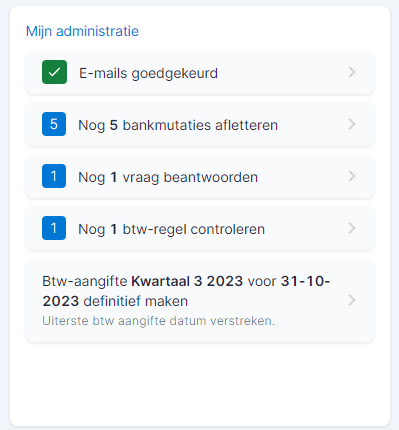
AFAS SB has been designed with user-friendliness in mind. You can manually customise many overviews so that you only see what is important to you. The software also offers a task list that helps you not to overlook tasks. Moreover, it is possible to start the task directly from this task list. This means you don't have to search separately for where in the software you can complete the task.
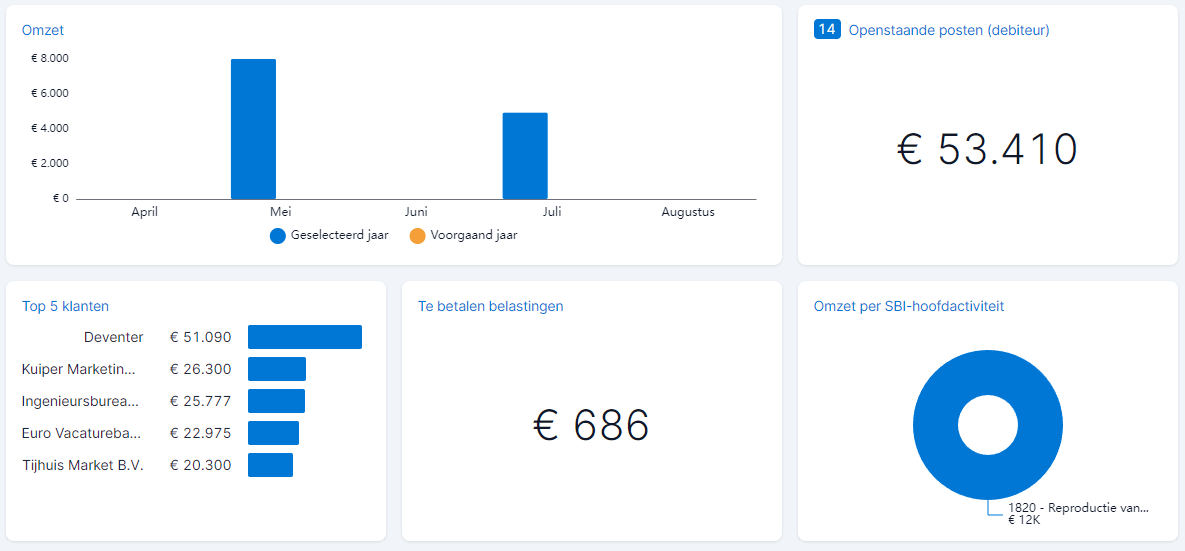
AFAS SB also has a dashboard that gives you immediate insight into how your business is doing. See the screenshot below:
Integrations and support
AFAS SB currently offers only a limited number of software integrations. With a software integration it is possible to send data automatically to other software without having to perform any manual actions. It is expected that more software integrations will become available soon. AFAS SB does have bank connections with ING, ABN, KNAB and Rabobank. With these you can import bank transactions automatically and easily link them to invoices.
AFAS SB offers little personal support, but compensates for this with an extensive knowledge base and a digital tour at the start. Given the user-friendliness of the software, it is questionable whether personal support is necessary.
Pricing
AFAS SB uses a transparent pricing model of 59 euros per month for two users, with a surcharge of 5 euros per additional user. A one-month trial period is free. Compared with other software vendors, the system is not modular, which means users have immediate access to all functions without step-by-step purchases. There are also no hidden costs for, for example, processing more bank transactions or scanning and recognising invoices.
SoftwareWatcher's conclusion
For organisations of 1 to 10 employees and freelancers, AFAS SB can be a very suitable and fitting accounting solution. The system is slightly more expensive than comparable packages, but offers a robust and user-friendly system with many extensive functions and no hidden costs. With AFAS SB you therefore always have all possible functions and know where you stand on price. AFAS SB stands out for its user-friendliness and clear task list, making it a solid choice for those looking for a complete accounting solution.
Benefits
- Very user-friendly
- Extensive functionality
- Automatically generate annual accounts
- Clear task management
- Option for direct debit
- No hidden costs
Disadvantages
- Not suitable for time and mileage tracking
- Limited software integrations (currently)
- Price can be on the high side if you don't need all the functionality
Software advice from SoftwareWatcher
Do you need advice on the best software? Get in touch now and we will draw up a list of the best software for your organisation.
Non-binding and without obligation