
- 16-10-2020
- 10:00
- timer 4 minutes
Tips for selecting software for businesses
There is a huge amount of software on the market for businesses, which makes selecting it difficult. That is why in this article we give a number of important tips on what to look out for when selecting software.
- Tip 1: Put together a project team with multiple disciplines
- Tip 2: Map out your processes
- Tip 3: Make a list of wishes and requirements
- Tip 4: Beware of specific requirements
- Tip 5: Be open to adapting business processes to the software standards
- Tip 6: Check the integration options to digitise further
- Tip 7: Save money by choosing a pricing model that suits your business
- Tip 8: Request one or more software demos
- Tip 9: Make free use of the software experts at SoftwareWatcher
Tip 1: Put together a project team with multiple disciplines
Purchasing new software often means that business processes change, and this usually demands something of your staff. Not everyone has a strong affinity with software, so it can take time to get used to it. So put together a project team with different disciplines from your company. When several disciplines are involved in the selection process, you spot early on whether or not the software is suitable for your business.
Tip 2: Map out your processes
Mapping out your processes is an important step in selecting the right software for your organisation. Once your processes are mapped out, you know exactly what the software has to meet. After all, the software should digitise these processes as far as possible.
Tip 3: Make a list of wishes and requirements
Business processes differ per sector, and the same goes for software features. One software product offers better features for a certain sector than for another. So draw up a list of wishes and requirements that the software must meet for your business.
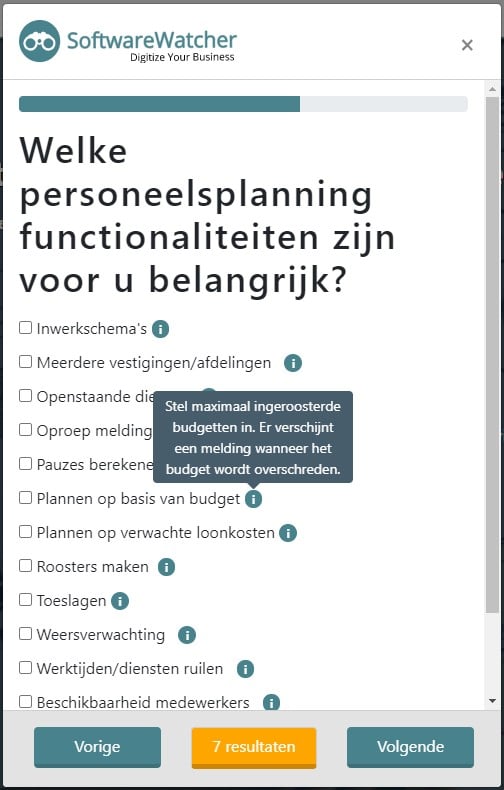
Not sure exactly what is possible with software? Then start the software selection tool or go to a SoftwareWatcher comparison page. There we explain, per software category, what is possible and you can easily determine what is important for your business. Below we have placed an example of important business processes and software features for staff scheduling.
Tip 4: Beware of specific requirements
When requirements and wishes become very specific, no software product will meet them. The question you must ask yourself is how great the added value of these requirements and wishes really is for your business. Custom software can be a solution for meeting these requirements and wishes, but it is often more expensive and maintenance is more intensive. That is why we recommend first looking at whether another – suitable – way of working is possible within your current software.
Tip 5: Be open to adapting business processes to the software standards
Don't regard your own business processes as sacred, but be open to new insights into how your business processes run. Software is developed with the idea of making business processes run as efficiently as possible, and this method has often been applied successfully at multiple companies.
Tip 6: Check the integration options to digitise further
Connecting software means linking two or more software systems together so that they exchange information with each other automatically, without you having to do anything. If, for example, you are happy with your accounting software and want to buy new software for generating payslips, it is handy if this software connects to it. Payroll changes are then processed automatically in your accounting software without manual actions.
Do you want to find out which software connects with which? Then consult our integration filter on one of our comparison pages.

Tip 7: Save money by choosing a pricing model that suits your business
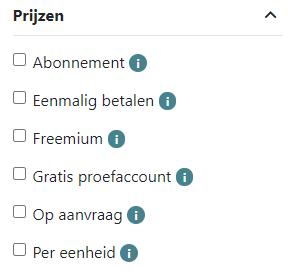
The pricing models of software suppliers differ and can vary from a subscription price, paying a price per unit, a freemium subscription or a one-off purchase price. What suits you best differs per company. We make this clear with the following example:
Practical example
Suppose you want to buy software for creating quotations. Many quotation software suppliers charge a fixed amount (subscription). If you make roughly 1 or 2 quotations per month, this monthly amount is often on the high side. In this case it is more advantageous to consider a quotation software supplier where you pay per quotation (price per unit). If, on the other hand, you draw up a lot of quotations per month, paying a fixed monthly amount is more advantageous.
With SoftwareWatcher's price filter you can easily and quickly find out what a software supplier's pricing model is. Consult the software selection tool or a comparison page for this.
Tip 8: Request one or more software demos
The way software features work differs per software product. It is therefore advisable to check the most important features of software products to see whether the way they work matches your expectations, as this is essential for your business operations. So request one or more demos of the software to make sure the software is suitable for your business. During a software demo, the software supplier gives a demonstration and explanation of the software. Below are 5 reasons why a software demo is valuable:
- Find out about the quality of the software features
- Get an impression of how user-friendly the software is
- Get to know the people behind the software
- Ask substantive questions about the software
- Get an accurate indication of the costs
With a software demo you find out whether the software and the software supplier suit your business.
Tip 9: Make free use of the software experts at SoftwareWatcher
Would you like to know more about selecting the right software for your business, or would you like independent and free advice on this? Then contact the software experts at SoftwareWatcher. We will gladly help you on your way with selecting the right software for your business.
Software advice from SoftwareWatcher
Do you need advice on the best software? Get in touch now and we will draw up a list of the best software for your organisation.
Non-binding and without obligation